|

🚀 Getting Started
This guide covers the basic setup for the RetroPy handheld console project, including hardware, firmware, editor options, palette basics, and a safe first workflow.
1) What You Have
This repo is a RetroPy handheld console project with:
- a launcher (
main.py) - a runtime/engine (
RetroPy/) - multiple games (
g_*folders) - art/audio assets (
.rs4,.bzz)

2) Minimum Setup
Hardware
- RP2040-based RetroPy-compatible handheld board
- USB cable (data-capable)
Firmware
- UF2 firmware in repo:
RetroPy1_240_alpha_0p2nush.uf2 - If you haven’t already done so, flash the retroPy UF2 firmware file to your board before testing games
[LINK_PLACEHOLDER: Firmware flashing guide]
Files on Device
At minimum, copy:
main.pyRetroPy/- all
g_*folders you want available - required asset folders/files (
Assets/, score files)
3) Editor Options
Online (browser)
 |
Viper-IDE [ https://viper-ide.org/ ] Best when you want direct web upload/edit for MicroPython boards. Good for quick edits and test loops. |
Offline (desktop)
 |
Thonny [ https://thonny.org/ ] Easiest MicroPython workflow for beginners. Good serial REPL + file management. |
 |
VS Code [ https://code.visualstudio.com ] Best for larger edits and refactors. Recommended with Python + MicroPython extensions. |
4) Running the Console
- Connect board over USB.
- Ensure project files are on device storage.
- Boot/run
main.py. - Use
UP/DOWNto choose ag_*game andAto launch.
5) Palette Basics (Important)
RetroPy drawing is palette-index based (not RGB literals in game scripts):
- Most draw calls use color index
0..15. - Example:
draw.text("Hello", x, y, 7)means color index7.
Typical usage pattern in this repo:
0: background/dark7: neutral text8..15: highlights/accent colors
Because palette mapping can differ by firmware/build, treat exact color appearance as device-dependent unless fixed in engine config.
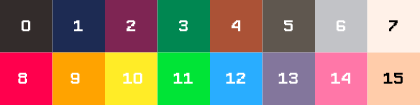
Quick Palette Test Snippet
Use this to print swatches on screen:
from RetroPy.retroPy import rpy, draw

def Update(dt):
    pass

def Draw(dt):
    draw.clear(0)
    for i in range(16):
        x = (i % 8) * 30
        y = (i // 8) * 40 + 20
        draw.filled_rect(x + 4, y, 24, 16, i)
        draw.text(str(i), x + 10, y + 20, 7)

rpy.run(Update, Draw)
6) First Safe Changes to Make
- Edit one game only (example:
g_Snake/Snake.py). - Keep
main.pylauncher untouched until comfortable. - Reuse
RetroPy/Sprites/assets before adding new binary assets.
7) Common Gotchas
- Wrong file/folder names can break launcher discovery (
g_*expected). - Missing asset files cause runtime load failures.
- Editing engine core (
RetroPy/retroPy.py) can affect every game. - Score files (
Scoreboard.txt) are plain text and can be reset accidentally.
8) Recommended Workflow
- Duplicate an existing game folder as a template.
- Make small edits.
- Run and test on hardware.
- Commit/backup often.